

Last updated: March 2026 · Reading time: 9 min · Category: Admin & Legal
The digital certificate (certificado digital or firma electrónica) is one of Spain’s most useful — and most underrated — admin tools. It allows you to complete dozens of official procedures online without visiting a government office in person: filing your tax return, requesting official certificates, managing social security, and much more.
This guide explains exactly how to get a digital certificate in Spain in 2026, covering the three-step FNMT process, where to go for in-person verification, and how to use it once you have it.
QUICK SUMMARY: The process has three steps: (1) install FNMT software and request your certificate online — you receive a code; (2) take that code to an authorised office (AEAT, Social Security, or Registro Civil) to verify your identity in person; (3) return to the same computer to download and install the certificate. Total time: 1–2 days.
The Spanish digital certificate (Certificado de Persona Física issued by FNMT — Fábrica Nacional de Moneda y Timbre) is an electronic identity credential stored on your computer. It lets you authenticate yourself with Spanish government websites and sign documents digitally — with the same legal validity as your physical signature.
With your digital certificate you can:
- File your annual income tax return (Declaración de la Renta / IRPF) online at agenciatributaria.es
- Submit Modelo 720 (overseas assets declaration) if required
- Request an official empadronamiento certificate from your Ayuntamiento online
- Manage your Social Security contributions (Tesorería General de la Seguridad Social)
- Apply for benefits, unemployment (SEPE), or check your pension forecast
- Complete residency renewals and other Extranjería procedures online (where available)
- Sign official documents electronically with full legal force
In short: once you have a digital certificate, dozens of admin tasks that used to require a physical appointment at a government office can be done from home.
What You Need Before Starting
- Your NIE (Número de Identificación de Extranjero) — you cannot apply without this
- A personal computer (Windows, macOS, or Linux) — the certificate is tied to the browser/computer
- A compatible browser — Mozilla Firefox is strongly recommended. Chrome can be configured to work but Firefox is simpler.
- IMPORTANT: You must complete all three steps on the same computer. Do not switch machines mid-process.
TIP: Before starting, make sure you are not planning to replace or reinstall your computer. The certificate is installed in the browser and tied to that machine. If you change computers, you will need to export and re-import the certificate, or apply again.
Step 1 — Install the FNMT Software and Request Your Certificate
Go to the FNMT website: sede.fnmt.gob.es — Certificado Electrónico de Ciudadano
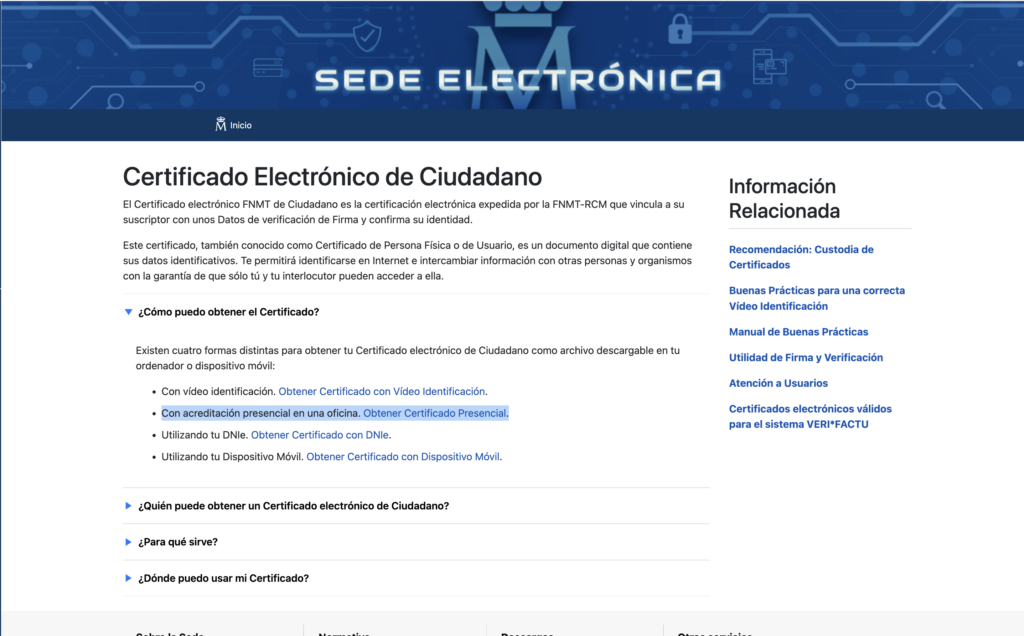
You’ll see a page listing four ways to obtain your certificate. Click the second option: “Con acreditación presencial en una oficina — Obtener Certificado Presencial”. This is the standard method where you verify your identity at a government office (we cover the alternative video option further below).
This takes you to a page with a progress bar showing four steps. You can also skip straight there with this direct link: Configuración Previa (Step 1)
1a. Install the FNMT Configurator (Configuración Previa)
- Click on Configuración Previa.
- On the Configuración Previa page, scroll down and click the link “Área de Descarga de Configurador FNMT” — a popup will appear with download links for Windows, macOS, and Linux.
- Download and install the version for your operating system. This is a small, free utility that prepares your browser to generate and store the certificate.
- Once installed, you don’t need to open the software — it runs automatically in the background when your browser needs it.
1b. Request your certificate (Solicitar Certificado)
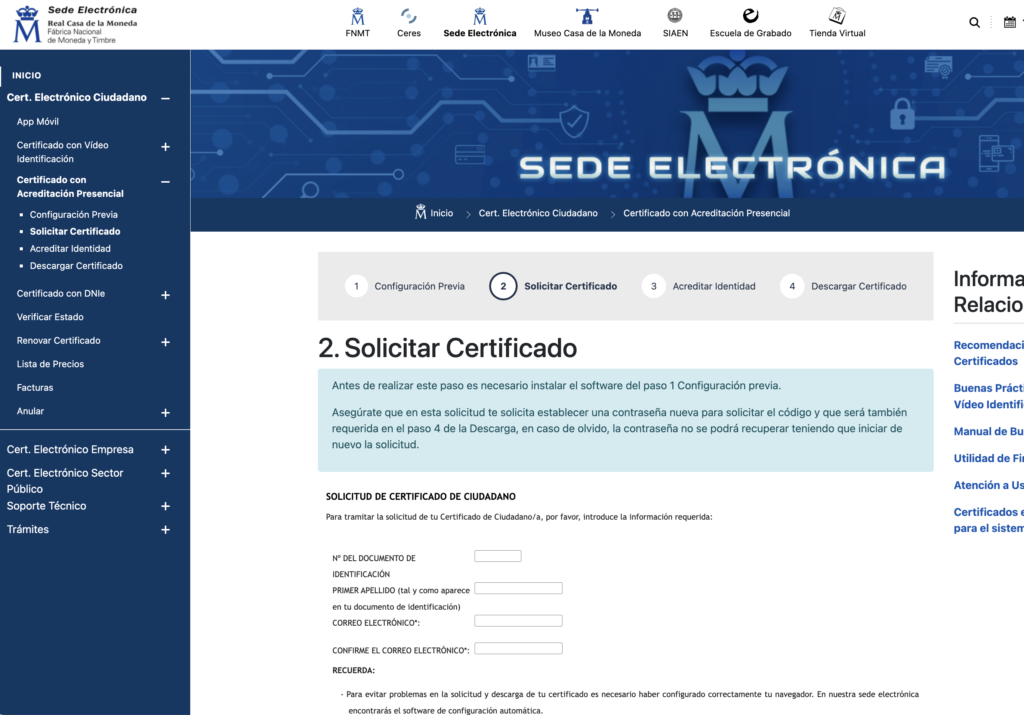
- Click “Solicitar Certificado” in the progress bar (Step 2), or use this direct link: Solicitar Certificado.
- Enter your NIE number, first name, and first surname exactly as they appear on your official Spanish documents.
- Enter your email address — FNMT will send your request code here.
- Submit the form. You will receive an email with your código de solicitud (request code) — a long alphanumeric string. Save this email — you need the code for the identity verification step.
FNMT sometimes takes a few minutes to send the email — check your spam folder if you don’t see it.
Step 2 — Verify Your Identity in Person
Within approximately 10 days of your online request (though sooner is better), you must attend an authorised office to verify your identity with your request code.
What to Bring:
- Your NIE certificate (the official green certificate or your TIE card)
- Your passport (original)
- The FNMT request code (printed or on your phone)
Where to verify your identity
Option A — AEAT (Tax Agency) Office — Most Common Choice
The Agencia Tributaria (AEAT) is the easiest option for most people. AEAT offices handle digital certificate verification free of charge, and they have offices in most Spanish cities and towns. Find your nearest AEAT office: agenciatributaria.es → ‘Oficinas’
Below are locations in the Canary Islands.
- In Gran Canaria: AEAT office at Calle Albareda, 7, Las Palmas de Gran Canaria
- In Tenerife: AEAT office at Avenida José Antonio Primo de Rivera, 30, Santa Cruz de Tenerife
- In Lanzarote: AEAT office at Arrecife (check agenciatributaria.es for current address)
- In Fuerteventura: AEAT office at Puerto del Rosario (check agenciatributaria.es for current address)
At AEAT, no prior appointment is required for digital certificate verification in most offices, but queues can be long. Arrive early, particularly in Las Palmas and Santa Cruz.
Option B — Social Security (Seguridad Social) Office — Free
Social Security offices (INSS — Instituto Nacional de la Seguridad Social) also handle identity verification for digital certificates. An appointment may be required. Book at sede.seg-social.gob.es.
Option C — Registro Civil — Free
Civil Registry offices can also perform the verification. Useful if AEAT and Social Security offices are busy.
Option D — Video Identification (Cl@ve) — €2.99 Online
If you cannot attend in person, you can use the FNMT’s video identification service (VAUd) for €2.99. This involves a live video call with an agent who verifies your identity remotely. Available at sede.fnmt.gob.es — look for ‘Acreditación por videoconferencia’. Important for expats: The video identification option requires a Spanish DNI (national ID card) and is not available to NIE holders. As a foreigner, you must verify your identity in person at one of the offices listed above (Options A–C).
Step 3 — Download and Install Your Certificate
After your identity has been verified, FNMT typically sends a confirmation email within 1–2 business days. Once you receive this:
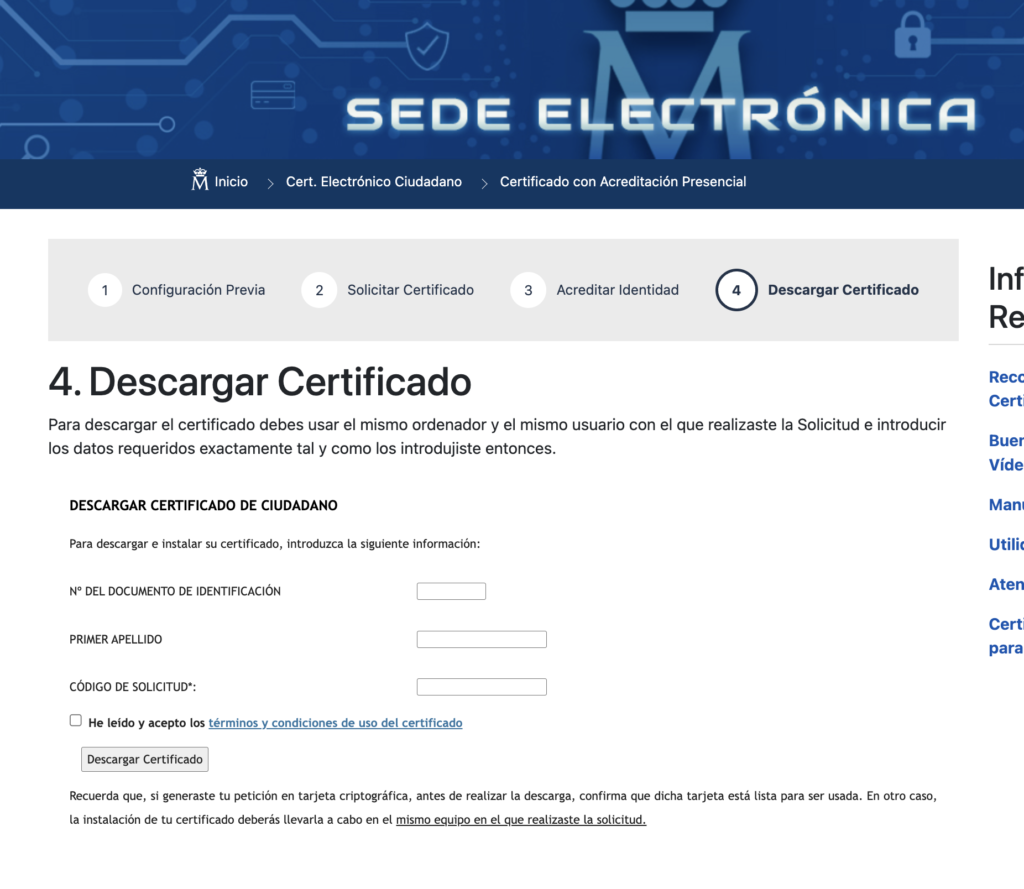
- Return to the FNMT website and click “Descargar Certificado” (Step 4 in the progress bar), or use this direct link: Descargar Certificado
- Enter your NIE (numero del documento de identificacion) and first surname (primer Apellido) and the same request code (codigo de solicitud) from your email
- Click ‘Descargar certificado’ — the certificate is installed automatically in your browser/keychain
- Test it immediately: go to agenciatributaria.es and try logging in with your certificate
- Make a backup: export the certificate as a .p12 file (Firefox: Settings → Privacy & Security → View Certificates → Your Certificates → Back Up). Store the backup file and its password safely.
IMPORTANT: Back up your certificate immediately after installation. If your computer fails, you will not be able to download it again without repeating the entire process.
What Can You Do With Your Digital Certificate?
| Task | Where | How Often |
|---|---|---|
| File income tax return (IRPF) | agenciatributaria.es | Annually (April–June) |
| File Modelo 720 (overseas assets) | agenciatributaria.es | Annually if applicable |
| Check/update tax details (Renta Web) | agenciatributaria.es | Any time |
| Request official padrón certificate | Your Ayuntamiento website | On demand |
| Manage Social Security | sede.seg-social.gob.es | As needed |
| Apply for SEPE (unemployment) | sepe.es | If applicable |
| Check DGT driving licence points | sede.dgt.gob.es | Any time |
| Submit Extranjería forms online | sede.administracionespublicas.gob.es | As needed |
The Cl@ve App — A Simpler (but More Limited) Alternative
Cl@ve is Spain’s digital identity system and a simpler alternative to the full FNMT certificate. You register online at clave.gob.es and verify your identity at a Social Security or AEAT office. The Cl@ve app on your phone then provides two-factor authentication for most government websites.
Cl@ve advantages:
- Works on your phone — no computer-tied certificate
- Simpler to set up
- Works for most tax and social security tasks
Cl@ve limitations:
- Cannot be used to digitally sign documents (only the full FNMT certificate supports this)
- Some advanced procedures still require the full digital certificate
- Less useful for professional or business use
Our recommendation: get both. The Cl@ve app is your quick day-to-day tool for government websites; the full FNMT certificate is your tool for tax filing and document signing.
You need either a digital certificate, the Cl@ve system, or a reference number (número de referencia) to access Renta Web and file your IRPF return online. The digital certificate gives the most functionality and is the most reliable option.
FNMT Person Física certificates are valid for 4 years from the date of issue. You will receive email reminders to renew. Renewal can be done entirely online without another in-person visit, provided your current certificate has not yet expired.
Yes — if you export the .p12 backup file, you can import it onto other computers. Go to Firefox Settings → Privacy & Security → View Certificates → Import and select your .p12 file. Keep the .p12 file and its password in a very safe place.
Most Spanish government websites are in Spanish only. However, many expats use Google Translate or a bilingual helper for the first few uses. Once you know which sections to navigate to, the process becomes routine. Some gestores (tax advisors) will handle the filing on your behalf using their own certificate and a power of attorney from you.
Yes — the FNMT Configurator is available for macOS. Install it and use Firefox for the process. Safari is not recommended for the FNMT process; Firefox has the most reliable compatibility.
Related Articles
- Empadronamiento — What It Is and Why It Matters
- How to Get Your NIE in Spain
- Non-Lucrative Visa Spain 2026 — Complete Guide
- Best Bank Accounts for Expats in Spain (2026)
Information correct as of March 2026. Fees, interest rates, and product terms change regularly. Always verify current details with providers before making financial decisions. Government website URLs and procedures change. Always verify current process at sede.fnmt.gob.es and agenciatributaria.es before starting.
Leave a Reply